Senior Engineer Led Codebase Audit: File:Line Findings, AI Triage
A codebase audit is a scoped, evidence-based assessment that combines repo mapping, automated scans, and targeted manual review to produce file:line findings, a dependency inventory, and a prioritized remediation backlog. The right audit checks work against recognized baselines like OWASP ASVS and NIST SSDF, not just a vendor’s proprietary rulebook. If a report hands you severity labels with no line numbers behind them, it isn’t an audit. It’s a guess with a cover page.
TL;DR:
- Automated scans should target high-churn and large files identified through git-churn analysis to maximize detection of critical security and quality issues.
- Findings must include precise file and line number citations to be actionable and verifiable, avoiding vague or high-level alerts.
- Using a combination of automated tools, manual review, and dynamic sampling ensures comprehensive detection of static and runtime vulnerabilities.
- Prioritization relies on severity, business impact, and dependency risks, with critical CVEs patched within 30 days taking top priority.
- A final report should include an executive summary, detailed findings with citations, dependency inventory, and a clear set of actionable fixes prioritized by impact and effort.
Table of Contents
- What Does a Codebase Audit Cover, and When Do You Need One?
- How Do You Prepare for a Codebase Audit?
- How Do You Conduct a Codebase Audit Step by Step?
- What Tools and AI Capabilities Should You Use During an Audit?
- How Do You Prioritize and Triage Audit Findings?
- What Should the Final Audit Report Include?
- Why Senior-Engineer-Led Audits Produce Higher-Signal Findings
- How Often Should You Actually Audit Your Codebase?
- Get a Fixed-Price Codebase Audit and Remediation Plan
- Where to Read More on Audit Standards and Methodology
- Sources
- FAQ
What Does a Codebase Audit Cover, and When Do You Need One?
A codebase audit differs from a routine code review in scope and permanence. Code review happens on a single pull request before merge. A codebase audit examines the whole system (or a defined slice of it) at a point in time, producing a standalone report rather than a merge decision. It also differs from a penetration test, which probes a running application from the outside. An audit reads the source directly, so it catches design flaws and dead code paths a pen test would never touch.
Most audits fall into a handful of categories, and teams often need more than one running in parallel:
- Security audits look for injection risks, broken authentication, exposed secrets, and insecure dependencies.
- Maintainability and technical debt assessments measure code quality, duplication, test coverage gaps, and architectural drift.
- Compliance audits verify the codebase meets a regulatory or contractual standard, such as data handling rules or industry certification requirements.
- Performance audits hunt for slow queries, memory leaks, and inefficient algorithms under real load.
Teams typically commission an audit before an acquisition, after a security incident, ahead of a major refactor, or simply because nobody has looked closely at the codebase in over a year. The output should never be a vague “looks okay” memo. Expect a risk register, a prioritized remediation backlog, and a software bill of materials (SBOM) documenting every dependency in play.
How Do You Prepare for a Codebase Audit?
Preparation determines whether the audit takes three days or three weeks. Rushing into scans without scoping wastes the auditor’s time and yours.
- Define objectives and success criteria. Are you checking for security exposure before a funding round, or hunting technical debt before a rewrite? The answer changes which tools and depth you need.
- Map repos, modules, and ownership. Identify the largest files and the ones with the highest git churn. These hotspots usually hide the worst problems because they get touched under deadline pressure more than anywhere else.
- Gather the paper trail. Pull the SBOM, dependency manifests, CI/CD logs, test coverage reports, and any prior audit findings.
- Set up access and environment. Provision read-only repo access, a staging environment with representative test data, and any tokens the audit team needs, scoped to expire after the engagement.
Pro Tip: Run a git-churn report before the audit even starts (git log --format=format: --name-only | sort | uniq -c | sort -rn). Files with high churn and high complexity are where most bugs and security issues cluster, and pointing the auditor there first cuts noise dramatically.
How Do You Conduct a Codebase Audit Step by Step?
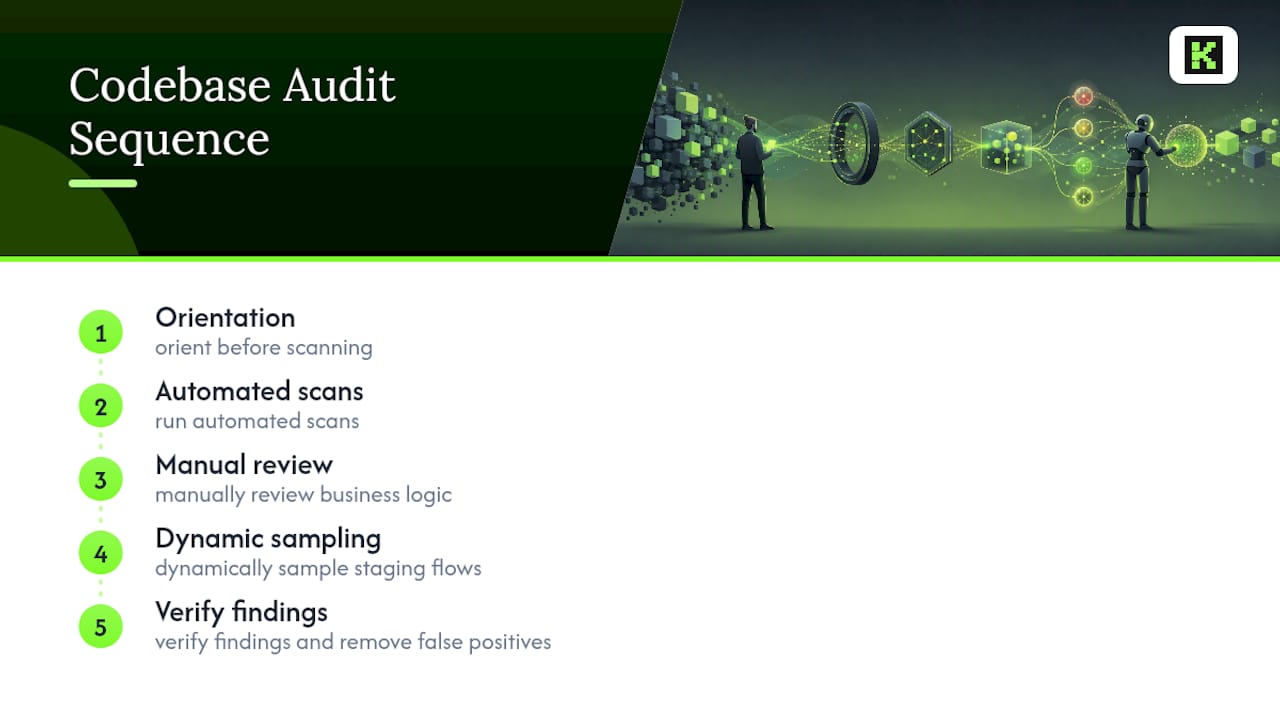
A codebase audit that produces citable, defensible findings follows a sequence. Skipping the orientation phase and jumping straight to scanners is the single most common mistake teams make, and it’s why so many audit reports read like generic linter output with a logo slapped on top.
Phase 1: Orient before you scan
Before touching a single scanning tool, read the manifest files (package.json, requirements.txt, go.mod, whatever the stack uses) to understand what the project actually depends on. Then run a git-churn analysis to find which files change most often and which ones are largest. Practitioner audit protocols treat this “forced orientation” step as mandatory, because scanning cold produces a wall of noise that buries the real issues. Build a rough mental model of the architecture: what talks to what, where the trust boundaries sit, where the money-critical logic lives.
Phase 2: Run automated scans
With orientation done, automated tooling earns its keep. Static Application Security Testing (SAST) tools flag injection risks and unsafe patterns. Dependency scanners cross-reference your manifests against known CVE databases. Secret scanners catch hardcoded API keys and credentials that somehow made it into version control (they always do, in every codebase, eventually). Quality gate tools measure code smells, duplication, and coverage against a defined threshold.
Targeted scans focused on hotspot files surface more actionable findings per hour than blind, repo-wide sweeps, as auditors avoid excessive low-priority warnings in seldom-changed files. That’s the entire logic behind orienting first.
Phase 3: Manual review for what tools miss
Automated tools don’t understand business logic. They can’t tell you that a discount calculation silently allows negative pricing, or that an internal admin endpoint has no authorization check because someone assumed it would only ever be called from the frontend. This is where a senior engineer reads the actual code, module by module, focusing on the architecture and the business-critical paths identified in Phase 1.
Every finding from this phase needs a file:line citation. Not “there’s an issue in the authentication module.” Instead: “auth/session.js:142, session tokens never expire, allowing indefinite reuse if intercepted.” Findings without exact citations are effectively unfalsifiable. Nobody can verify them, and engineering teams routinely ignore them because there’s nothing concrete to act on.
Phase 4: Dynamic sampling
Static review only tells part of the story. Run smoke tests against the staging environment, sample a handful of integration flows end-to-end, and try light fuzzing on any public-facing input fields. This phase often catches issues static analysis misses entirely, like a race condition that only shows up under concurrent requests.
Phase 5: Verify and kill false positives
Every automated finding gets a manual check before it lands in the final report. A “vulnerable dependency” alert on a package that’s only used in a build script with no runtime exposure isn’t a real risk. Filtering these out before delivery is what separates a useful audit from a 200-page PDF nobody reads past page 4.
For very large codebases, this whole process gets parallelized by module rather than attempted as one continuous sweep, since context limits and tooling constraints make a monolithic pass impractical past a certain repo size.
What Tools and AI Capabilities Should You Use During an Audit?
Different problems call for different tool categories, and no single scanner covers all of them. Linters (ESLint, Pylint, RuboCop) catch style and basic correctness issues fast and cheap. SAST tools go deeper into security-specific patterns. Dynamic Application Security Testing (DAST) tools probe a running instance the way an attacker would. Dependency and SBOM tools track every package and its known vulnerabilities. Secret scanners catch what should never have been committed in the first place.
CI integration turns a one-time audit into an ongoing discipline. SonarQube’s model is a useful reference point: a pipeline triggers the scanner, the scanner submits results, and a quality gate either passes the build or blocks it based on predefined thresholds for coverage, duplication, and new issues. That gate is what keeps an audit’s findings from decaying back into technical debt six months later.
AI tools genuinely help with specific tasks in this process:
- Summarizing large diffs and flagging which files deserve manual attention.
- Generating draft file:line citations that a human then verifies against the actual code.
- Triaging scanner output to separate likely false positives from real findings.
- Producing a persistent, versioned artifact (something like a TECH_DEBT_AUDIT.md) that survives beyond a single Slack thread.
Pro Tip: Treat AI output as a first draft, never a final finding. The most reliable audits pair AI-assisted triage with a human review step before anything ships, because an AI model will confidently cite the wrong line number just as often as it gets one right.
Combine language-native tools per stack (a Python-specific SAST tool won’t catch Go-specific pitfalls) and consolidate everything into one findings format before reporting. A dozen tool outputs in a dozen formats is not a deliverable.
How Do You Prioritize and Triage Audit Findings?
Raw findings mean nothing without a system for deciding what gets fixed first. The standard approach scores each issue on severity, remediation effort, and business exposure, then sorts the backlog accordingly.
- Build the severity by effort by exposure matrix. A critical vulnerability in a payment flow beats a medium-severity issue in an internal admin tool nobody outside the company ever sees, even if the admin tool issue is technically easier to fix.
- Apply dependency-specific rules. A common threshold: any critical CVE unpatched for more than 30 days automatically escalates to top priority regardless of where it sits in the codebase.
- Assign owners and estimate effort. Every item in the backlog needs a name attached and a rough time estimate, or it sits untouched indefinitely.
- Add regression tests alongside fixes. A fix without a test is a fix that silently reverts during the next refactor.
- Document accepted risks. Some findings will get a deliberate “not fixing this, here’s why” decision. Write that reasoning down, including who signed off, so the same question doesn’t resurface in eight months.
That last point matters more than most teams realize. A short “looks bad but is fine” section in the report, documenting rejected refactors and the rationale behind them, saves real engineering hours by preventing the next auditor from re-litigating a decision that was already made deliberately.
What Should the Final Audit Report Include?
A codebase audit’s real value shows up in what teams can act on immediately after reading it. The report needs an executive summary stating the top three to five risks and what resources fixing them requires, plus a detailed findings table developers can work from directly.
| Deliverable | What It Contains |
|---|---|
| Executive summary | Top risks, business impact, resource ask for remediation |
| Findings table | File:line citation, severity, estimated effort, recommendation, status |
| SBOM and dependency inventory | Full list of packages, versions, and known CVEs |
| CI evidence | Quality gate results or screenshots showing current pass/fail state |
| Top-5 priorities | Highest-impact, lowest-effort fixes to start immediately |
The findings table is the working document engineers actually open during sprint planning. Everything else in the report supports it.
Why Senior-Engineer-Led Audits Produce Higher-Signal Findings
Junior reviewers and unsupervised automated tools tend to generate volume: hundreds of flagged lines, most of them low-value noise about naming conventions or minor style deviations. A senior engineer who has shipped and maintained production systems reads the same code differently. They know which patterns actually cause outages at 2 a.m. and which ones are cosmetic.
The audit model applies a senior-engineer-led approach, cutting out layers of review and re-review that slow down less experienced teams and dilute finding quality. Clients get a single accountable contact for the entire engagement, transparent fixed pricing agreed before work starts, and rapid response times when questions come up mid-audit.
A codebase audit is only as useful as the specificity of its findings. Vague severity labels get filed and forgotten. File:line citations tied to a clear remediation path get fixed.
A high client retention rate reflects engagements where the deliverable was clear enough to act on the day it arrived, not filed away for a future sprint that never comes.
How Often Should You Actually Audit Your Codebase?
Full audits and continuous checks solve different problems, and conflating them wastes budget in both directions. A full audit makes sense before an acquisition, after a system-critical incident, or ahead of a major architectural refactor where the cost of getting it wrong is measured in months, not days. Outside those triggers, running a full audit every quarter is usually overkill for most teams.
What actually holds up over time is continuous scanning wired into CI, paired with a lighter technical debt assessment every quarter. Small codebases can often get by with automated scans plus a manual spot check twice a year. Medium codebases benefit from monthly hotspot reviews on the highest-churn files. Large, multi-team codebases need module-level owners running their own lightweight audits on a rolling basis, with a full cross-system audit reserved for genuine inflection points.
The mistake I see most often isn’t under-auditing. It’s treating every audit like a fire drill instead of building the cadence into how the team already works.
— Ints
Get a Fixed-Price Codebase Audit and Remediation Plan
Running scanners and reading through git-churn reports takes real engineering hours you may not have to spare, especially if your team is already stretched across feature work. Kellosolutions handles the whole arc: audit, prioritized remediation, and handover documentation, delivered by senior engineers only, with transparent fixed pricing agreed before the engagement starts and a fixed delivery date instead of an open-ended timeline.
You get a single accountable contact for the entire engagement rather than a rotating cast of account managers and junior developers relaying information back and forth. If the audit surfaces a rebuild opportunity instead of a patch job, the same team can move straight into an MVP build without a second vendor search. Request a scoped estimate through the Kellosolutions services page and get a fixed price and delivery date before any work begins.
Where to Read More on Audit Standards and Methodology
For teams building an internal audit checklist, the OWASP Application Security Verification Standard 4.0 defines the security control objectives referenced above. NIST’s SSDF guidance covers secure practices across the development lifecycle. SonarQube’s documentation details CI integration mechanics, and the tech-debt audit protocol on GitHub walks through the orientation-first methodology referenced throughout this guide.
Sources
- OWASP Application Security Verification Standard 4.0
- Mitigating the Risk of Software Vulnerabilities by Adopting a Secure Software Development Framework (SSDF)
- SonarQube analysis process
- ksimback/tech-debt-skill (audit protocol)
FAQ
What Are the Four Main Types of Codebase Audits?
The four main types are security audits, maintainability or technical debt assessments, compliance audits, and performance audits. Most engagements blend at least two, since a security issue often traces back to a maintainability problem like an unowned, undocumented module.
What Does “Audit” Mean in a Coding Context?
In software, an audit means a systematic, evidence-based review of source code against defined standards, producing documented findings rather than informal opinions. A proper audit ties every finding to a specific file and line number, following the same evidence standard OWASP ASVS applies to security verification reports.
What Does a Code Auditor Actually Do Day to Day?
A code auditor maps the repository, runs automated scans against dependencies and code patterns, and then manually reviews architecture and business logic that tools can’t evaluate on their own. The output is a prioritized findings report, not a pass or fail grade.
Are There “5 C’s” of Auditing?
There’s no single, universally recognized “5 C’s” framework specific to codebase audits. Definitions vary by source, so treat any list claiming this as informal shorthand rather than an established industry standard.
How Much Does a Managed Codebase Audit Cost?
Pricing depends on codebase size and scope, so Kellosolutions quotes each audit engagement individually after a scoping conversation. Current service pricing and details are available on the Kellosolutions services page.